

The current software development challenge for Microsoft developers, is getting large .NET projects into .NET 8 (soon to be .NET 9).
Modernizing the codebase is crucial as developers need efficient code, maintainable code, and a scalable app. At SSW we have been on this migration journey, migrating a bunch of client’s large enterprise applications for the last two years.
This blog post dives into our internal journey of TimePro’s migration to .NET 8, highlighting the metrics, and what the more organized codebase ends up looking like.
The Challenge
TimePro, is an application with a codebase that has grown organically over the years from .NET Framework 1.0 to .NET Framework 4.8. We faced the typical challenges of legacy systems. The need to transition to .NET 8 presented an opportunity to not only upgrade the technology stack, but also to streamline and enhance the code structure.
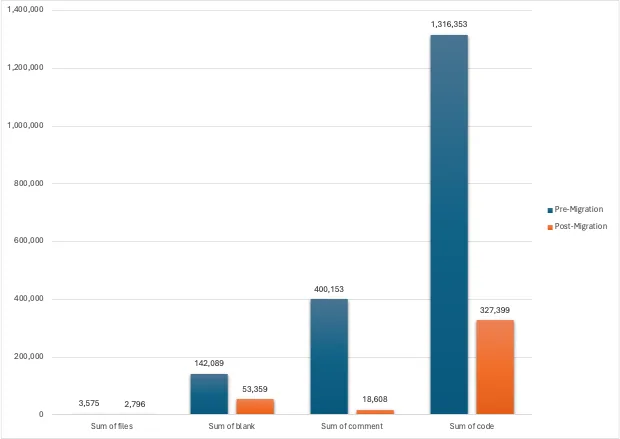
Codebase Comparison: Before and After Migration
When working on software projects, it’s important to keep track of your codebase’s size and structure. Code line metrics help you understand the scope of the code, identify potential areas for refactoring, and maintain a healthy balance between files, blank line comments, and code.
With these metrics, you get a sense of the size of your project, compared with other projects you’ve dealt with.
The tool cloc (opens in a new tab) is a straightforward yet powerful way to count the number of files, blank lines, comment lines, and physical lines of source code across various programming languages. Check out this SSW Rule: https://www.ssw.com.au/rules/get-code-line-metrics/ (opens in a new tab)
After collecting raw data using the cloc tool, you can use ChatGPT to generate insightful charts that visualize your codebase’s metrics. These charts make it easier to understand trends and compare different parts of your code. Check out the SSW Rule: https://www.ssw.com.au/rules/use-chatgpt-to-generate-charts (opens in a new tab).
Let’s look at the stats for SSWTimepro.com
1. File Count Reduction
– Before Migration (.NET 4.8): The codebase had a ton of files, obviously contributing to complexity.
– ✅ After Migration (.NET 8.0): The file count was reduced by a whopping 22%. We landed with a simplified structure, and it was easier to navigate.
2. Code Lines Reduction
– Before: The original codebase had many lines of code that were redundant (or could be optimized).
– ✅ After: The code lines were reduced by 75%. We trimmed a lot of unnecessary code and leveraged many .NET 8 native features as much as possible.
3. Blank Lines Reduction
– Before: TimePro had a significant number of blank lines – the problem was more the inconsistency than the number of blank lines.
– ✅ After: The blank lines were reduced by 62%… however if correlated to code lines, it would have been 75% – so it appears more blank lines were added, aiding consistent readability.
4. Comment Lines Reduction
– Before: A high number of comment lines, is often not needed if the code is self-explanatory. A lot of comments can indicate complicated code that needs explanations. Or redundancy which is clutter.
– ✅ After: The comment lines were reduced by a massive 95%, indicating better self-documenting code practices.
After the migration, we now have 43k blank lines vs 185k code, which is 23% or roughly 1:4 ratio. This means that we have a new line after 4 lines of code. It’s like having a book that has reasonably sized paragraphs for people to read. We achieve that by making a code block that can be read as a single unit, for instance, updating the timesheet’s total and tax amounts.
| Values | Pre-Migration | Post-Migration | Diff (reduced) |
| Sum of files | 3,575 | 2,796 | -22% |
| Sum of blank | 142,089 | 53,359 | -62% |
| Sum of comment | 400,153 | 18,608 | -95% |
| Sum of code | 1,316,353 | 327,399 | -75% |
Figure: Code metrics before and after .NET 8 migration
Efficiency and Maintainability
The migration to .NET 8 and EF Core 8 (aka EF8) was not just about adopting new technology, but also about making the codebase more efficient and maintainable.
The new codebase is designed with a Modular Monolith architecture (opens in a new tab) (thanks to Daniel Mackay who leads the SSW Software Architects team), enhancing the quality and maintainability of the code. This architecture allows for easier introduction of microservices when needed, ensuring that TimePro can scale and adapt to future requirements.
Insights from the Migration
- App Modernization: The team focused on modernization to .NET and trimming any fat that was remnants from prior versions. This meant that the final.NET 8 looked completely new.
- Code Removal: At least 50k lines of code were removed as part of the migration to EF Core 8 and leveraging existing .NET features that weren’t available in the .NET Framework.
- Dependency Removal (NuGet): There was one commit that removed 1 million lines of code – because a new Dynamics library meant a lot of code could be killed.
A comparison of TimePro vs other .NET enterprise projects
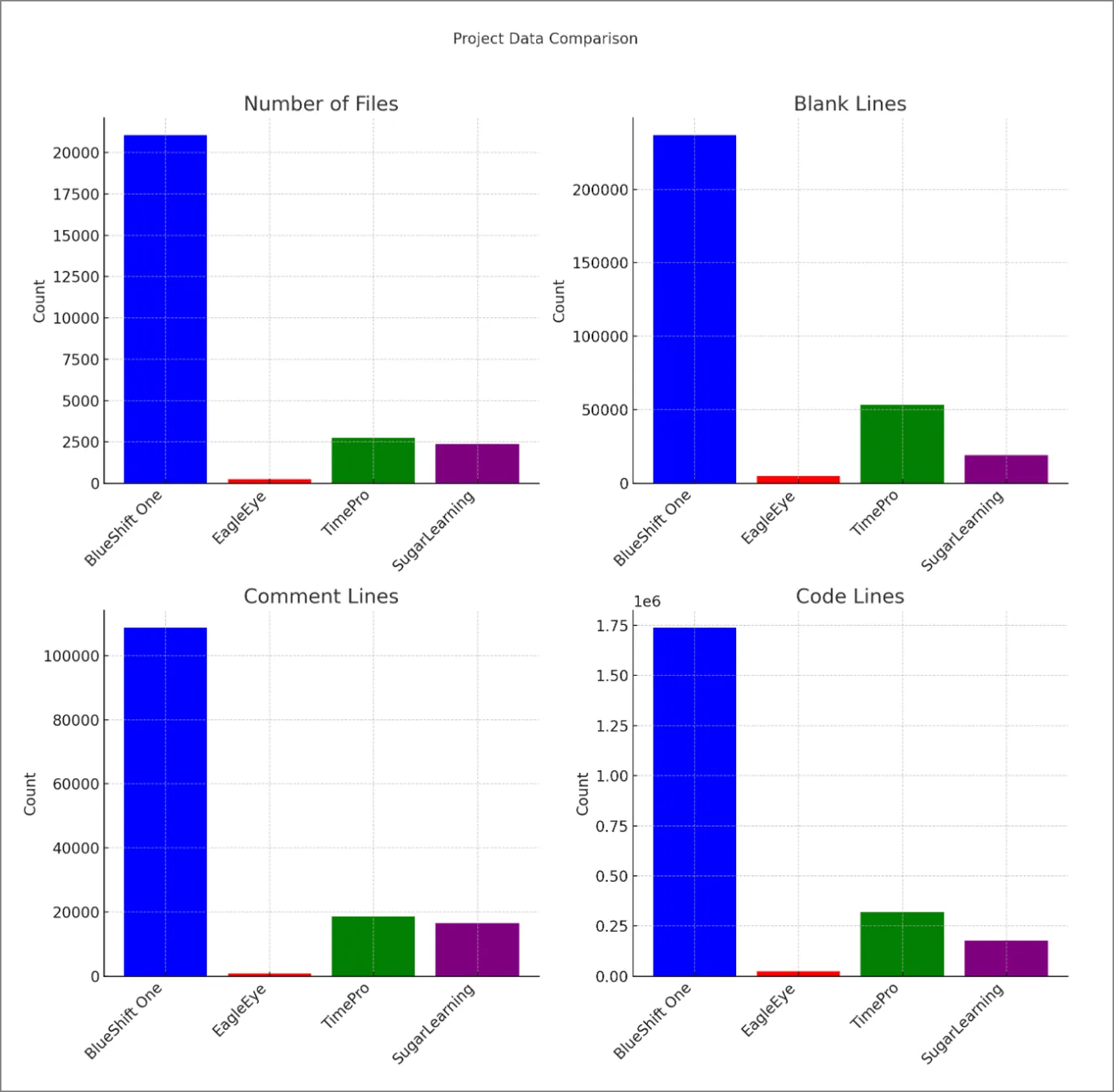
The chart above represents the comparison with:
- BlueShift One (an enterprise planning system for fast-moving consumer goods suppliers, managing their volume and financial forecast in the context of highly elastic in-store promotions)
- SSWEagleEye.com (an email and GitHub AI-based reporting tool)
- SSWTimePro.com (a timesheet and billing system with integration with Dynamics, Azure DevOps, and GitHub)
- SugarLearning.com (a learning management and induction system)
Conclusion
I encourage you to start with a well-planned migration process. The TimePro migration to .NET 8 was a substantial task – but it is important to continuously modernize any project, if the software is going forward for the business. While doing the migration we made sure that there was a focus on code quality and code organization, so the application was in a nice maintainable state.
The migration team did it over a bunch of 1- week Sprints. I was impressed with the TimePro team’s journey, and as the Product Owner I learned many valuable things that will help me with similar challenges when migrating other legacy systems. I am sure there are a lot of old important .NET applications out there!!!
When do you plan to migrate to .NET 8? Let me know in the comments 🥳
More Info:
| Sum of files | Sum of blank | Sum of comment | Sum of code | |||||
| Pre-Migration | Post-Migration | Pre-Migration | Post-Migration | Pre-Migration | Post-Migration | Pre-Migration | Post-Migration | |
| ASP.NET | 4 | 1 | 3 | 0 | 0 | 0 | 39 | 1 |
| C# | 1,889 | 1,834 | 85,985 | 43,088 | 165,309 | 9,040 | 821,420 | 184,213 |
| C# Generated | 127 | 2 | 17,790 | 23 | 188,475 | 132 | 21,233 | 91 |
| Cake Build Script | 1 | 1 | 26 | 35 | 22 | 22 | 210 | 269 |
| Diff | 4 | 4 | 4 | 4 | 34 | 34 | 108 | 108 |
| DOS Batch | 3 | 3 | 10 | 15 | 0 | 5 | 20 | 29 |
| F# Script | 1 | 1 | 8 | 8 | 0 | 0 | 36 | 36 |
| HTML | 130 | 142 | 543 | 539 | 146 | 108 | 9,323 | 9,284 |
| INI | 2 | 4 | 45 | 458 | 0 | 0 | 175 | 1,151 |
| JavaScript | 4 | 1 | 44 | 0 | 15 | 0 | 233 | 34 |
| JSON | 38 | 35 | 4 | 3 | 0 | 0 | 15,871 | 1,923 |
| Markdown | 36 | 61 | 481 | 1,076 | 0 | 15 | 1,322 | 2,606 |
| MSBuild script | 35 | 38 | 188 | 140 | 39 | 14 | 9,671 | 1,247 |
| PowerShell | 21 | 22 | 257 | 253 | 91 | 109 | 1,055 | 1,095 |
| Razor | 86 | 8 | 1,246 | 513 | 2,373 | 1,145 | 8,704 | 2,956 |
| SCSS | 84 | 104 | 1,258 | 1,388 | 1,091 | 1,095 | 4,378 | 4,988 |
| SQL | 300 | 14 | 20,432 | 2,331 | 32,160 | 5,979 | 198,960 | 80,801 |
| SVG | 16 | 3 | 0 | 0 | 3 | 1 | 3,101 | 38 |
| Text | 28 | 11 | 133 | 4 | 0 | 0 | 3,179 | 1,855 |
| TypeScript | 415 | 441 | 7,932 | 3,322 | 6,846 | 557 | 44,127 | 24,379 |
| Visual Studio Solution | 2 | 3 | 1 | 2 | 2 | 2 | 509 | 527 |
| XML | 129 | 58 | 1,624 | 107 | 1,121 | 292 | 113,853 | 9,417 |
| YAML | 2 | 5 | 35 | 50 | 10 | 58 | 200 | 351 |
| Grand Total | 3,357 | 2,796 | 138,049 | 53,359 | 397,737 | 18,608 | 1,257,727 | 327,399 |
Figure: Breakdown by Language
Comments
No comments on this post.